

def gauss_kern(size, sizey=None):
    """ Returns a normalized 2D gauss kernel array for convolutions """
    size = int(size)
    if not sizey:
        sizey = size
    else:
        sizey = int(sizey)
    x, y = mgrid[-size:size+1, -sizey:sizey+1]
    g = exp(-(x**2/float(size)+y**2/float(sizey)))
    return g / g.sum()
def gauss_kern(size, sizey=None):
    """ Returns a normalized 2D gauss kernel array for convolutions """
    size = int(size)
    if not sizey:
        sizey = size
    else:
        sizey = int(sizey)
    x, y = scipy.mgrid[-size:size+1, -sizey:sizey+1]
    g = scipy.exp(-(x**2/float(size)+y**2/float(sizey)))
    return g / g.max()
# -*- coding: utf-8 -*-
import os
import csv
import string

def touch(fname, times = None):
    with file(fname, 'a'):
        os.utime(fname, times)


for i in range(0, 939):
  with open('../data/maskFilenames.csv', 'rb') as f:
    mycsv = csv.reader(f)
    mycsv = list(mycsv)
    fname = string.strip(mycsv[i][1])
    touch(fname)
    print fname
  wrongFilenames = []
  for i in range(0, noOfGalaxies):
    maskFile = GalaxyParameters.getMaskUrl(listFile, dataDir, simpleFile, i)
    print i, 'maskfile: ', maskFile
    try:
      f = open(maskFile)
      print "maskfile exists:", maskFile
    except IOError as e:
      wrongFilenames.append(maskFile)
masked = np.where(mask != 0)
mask[masked] = mask[masked]/mask[masked]
from astLib import astWCS

WCS=astWCS.WCS("Galaxy.fits")

center = WCS.wcs2pix(ra, dec)
print center
print 'brightness at the galaxy center', img[center[1], center[0]]
wget http://das.sdss.org/imaging/'+run+'/'+rerun+'/calibChunks/'+camcol+'/tsField-'+runstr+'-'+camcol+'-'+rerun+'-'+field_str+'.fit
Michael Kramer (MPIfR/JBCA) gave a captivating and eloquent talk this morning on using pulsars as tests for GR and as constraints on alternative theories of gravity. It's possible to use pulsar data to measure post-Keplerian parameters of the only known double pulsar system, and GR passes all the tests with flying colours. Measurements of other binary pulsar systems (PS + a white dwarf, for example) very probably put an end to MOND and other TeVeS gravity theories.
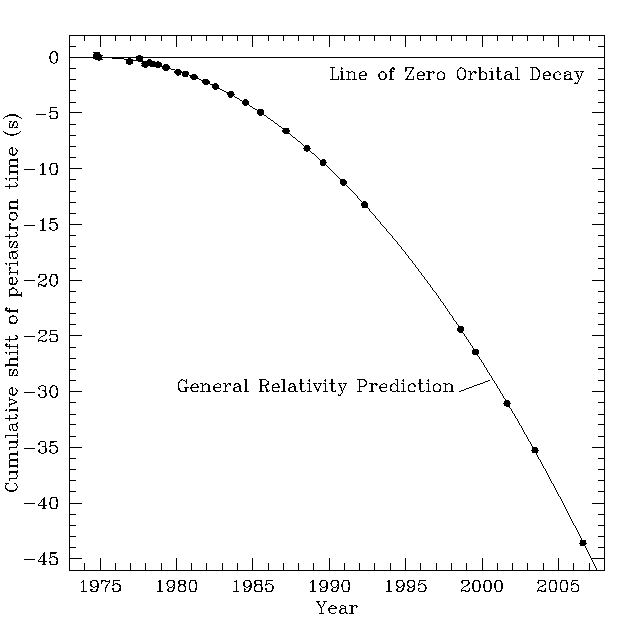
Pulsar timing is precise to 10^-18 s, more precise than atomic clocks and it's apparently possible to notice irregularities in the terrestrial atomic timescale. Perihelion precession of pulsar binary systems is of order of degrees/year, meaning that Newtonian dynamics are completely inadequate here (one would be hopelessly lost soon, if she tried to navigate her spaceship in the system using Newton's dynamics. The stars would be out of place).This image, showing the change in revolution time in binary pulsar system, came up. It's the strongest proof of gravitational wave existence so far, showing how the system radiates its energy away as ripples in the spacetime. The uncertainties are too small to picture.
import os
import pyfits
import csv
import numpy
import string
import gzip


#awk < sdss_database_dump.csv 'BEGIN { FS="," }; { print $1,",",$2,",",$3,",",$8,",",$9,",",$10,",",$11}' > list.txt

dataFile = 'list.txt'

#the next three functions are from sdsspy library (http://code.google.com/p/sdsspy/)

def run2string(runs):
    """
    rs = run2string(runs)
    Return the string version of the run.  756->'000756'
    Range checking is applied.
    """
    return tostring(runs,0,999999)

def field2string(fields):
    """
    fs = field2string(field)
    Return the string version of the field.  25->'0025'
    Range checking is applied.
    """
    return tostring(fields,0,9999)


def tostring(val, nmin=None, nmax=None):
    if not numpy.isscalar(val):
        return [tostring(v,nmin,nmax) for v in val]
    if isinstance(val, (str,unicode)):
 nlen = len(str(nmax))
 vstr = str(val).zfill(nlen)
 return vstr
    if nmax is not None:
        if val > nmax:
            raise ValueError("Number ranges higher than max value of %s\n" % nmax)
    if nmax is not None:
        nlen = len(str(nmax))
        vstr = str(val).zfill(nlen)
    else:
        vstr = str(val)
    return vstr


csvReader = csv.reader(open(dataFile, "rU"), delimiter=',')
f = csv.writer(open('angles.txt', 'w'), delimiter=',')
for row in csvReader:
      print '********************************', row[0]
      ID = string.strip(row[0])
      ra = string.strip(row[1])
      dec = string.strip(row[2])
      run = string.strip(row[3])
      rerun = string.strip(row[4])
      camcol = string.strip(row[5])
      field = string.strip(row[6])
      runstr = run2string(run)
      field_str = field2string(field)
      print 'wget http://das.sdss.org/imaging/'+run+'/'+rerun+'/corr/'+camcol+'/fpC-'+runstr+'-r'+camcol+'-'+field_str+'.fit.gz'
      os.system('wget http://das.sdss.org/imaging/'+run+'/'+rerun+'/corr/'+camcol+'/fpC-'+runstr+'-r'+camcol+'-'+field_str+'.fit.gz')
      print 'uncompressing..'
      gz = gzip.open('fpC-'+runstr+'-r'+camcol+'-'+field_str+'.fit.gz')
      imgFile = pyfits.open(gz, mode='readonly')
      print 'getting header info...'
      head = imgFile[0].header
      angle = head['SPA']
      info = (int(ID), angle)
      f.writerow(info)


I had solved that interpolation task I was working on previously, by the way. I post my approach here, in case someone finds it useful.
If the bad pixel regions are big, standard methods of interpolation are not applicable. Interpolation works under assumption that the regions are contiguous, whereas this is not necessarily the case. Besides, none of interpolation implementations in python seem to work with masked arrays, and I've tried a metric ton of them. miceuz, who was sitting on this task half night as well, asked about it on stackoverflow, and someone mentioned the right keyword: inpainting.That's still inventing the data, but the option is having unquantifiable errors in photometry if we leave out the bad pixels or don't mask the bad areas at all.
OpenCV is a huge piece of software, and using it to fill those holes is tantamount to using a hammer to crack a nut. However, I reused this tiny piece of code, adding a [hardcoded ,)] Gaussian weights kernel as I needed to use inverse distance weighting for interpolation. Here's the code:
import numpy as np
import pyfits
from scipy import ndimage
import inpaint


maskedImg = np.ma.array(cutout, mask = cutoutMask)
NANMask =  maskedImg.filled(np.NaN)


badArrays, num_badArrays = sp.ndimage.label(cutoutMask)
print num_badArrays
data_slices = sp.ndimage.find_objects(badArrays)

filled = inpaint.replace_nans(NANMask, 5, 0.5, 2, 'iwd')
hdu = pyfits.PrimaryHDU(filled)
hdu.writeto('filled_lm.fits')
# -*- coding: utf-8 -*-

"""A module for various utilities and helper functions"""

import numpy as np
#cimport numpy as np
#cimport cython

DTYPEf = np.float64
#ctypedef np.float64_t DTYPEf_t

DTYPEi = np.int32
#ctypedef np.int32_t DTYPEi_t

#@cython.boundscheck(False) # turn of bounds-checking for entire function
#@cython.wraparound(False) # turn of bounds-checking for entire function
def replace_nans(array, max_iter, tol,kernel_size=1,method='localmean'):
    """Replace NaN elements in an array using an iterative image inpainting algorithm.
The algorithm is the following:
1) For each element in the input array, replace it by a weighted average
of the neighbouring elements which are not NaN themselves. The weights depends
of the method type. If ``method=localmean`` weight are equal to 1/( (2*kernel_size+1)**2 -1 )
2) Several iterations are needed if there are adjacent NaN elements.
If this is the case, information is "spread" from the edges of the missing
regions iteratively, until the variation is below a certain threshold.
Parameters
----------
array : 2d np.ndarray
an array containing NaN elements that have to be replaced
max_iter : int
the number of iterations
kernel_size : int
the size of the kernel, default is 1
method : str
the method used to replace invalid values. Valid options are
`localmean`, 'idw'.
Returns
-------
filled : 2d np.ndarray
a copy of the input array, where NaN elements have been replaced.
"""

#    cdef int i, j, I, J, it, n, k, l
#    cdef int n_invalids

    filled = np.empty( [array.shape[0], array.shape[1]], dtype=DTYPEf)
    kernel = np.empty( (2*kernel_size+1, 2*kernel_size+1), dtype=DTYPEf )

#    cdef np.ndarray[np.int_t, ndim=1] inans
#    cdef np.ndarray[np.int_t, ndim=1] jnans

    # indices where array is NaN
    inans, jnans = np.nonzero( np.isnan(array) )

    # number of NaN elements
    n_nans = len(inans)

    # arrays which contain replaced values to check for convergence
    replaced_new = np.zeros( n_nans, dtype=DTYPEf)
    replaced_old = np.zeros( n_nans, dtype=DTYPEf)

    # depending on kernel type, fill kernel array
    if method == 'localmean':

        print 'kernel_size', kernel_size
        for i in range(2*kernel_size+1):
            for j in range(2*kernel_size+1):
                kernel[i,j] = 1
        print kernel, 'kernel'

    elif method == 'idw':
        kernel = np.array([[0, 0.5, 0.5, 0.5,0],
                  [0.5,0.75,0.75,0.75,0.5],
                  [0.5,0.75,1,0.75,0.5],
                  [0.5,0.75,0.75,0.5,1],
                  [0, 0.5, 0.5 ,0.5 ,0]])
        print kernel, 'kernel'
    else:
        raise ValueError( 'method not valid. Should be one of `localmean`.')

    # fill new array with input elements
    for i in range(array.shape[0]):
        for j in range(array.shape[1]):
            filled[i,j] = array[i,j]

    # make several passes
    # until we reach convergence
    for it in range(max_iter):
        print 'iteration', it
        # for each NaN element
        for k in range(n_nans):
            i = inans[k]
            j = jnans[k]

            # initialize to zero
            filled[i,j] = 0.0
            n = 0

            # loop over the kernel
            for I in range(2*kernel_size+1):
                for J in range(2*kernel_size+1):

                    # if we are not out of the boundaries
                    if i+I-kernel_size < array.shape[0] and i+I-kernel_size >= 0:
                        if j+J-kernel_size < array.shape[1] and j+J-kernel_size >= 0:

                            # if the neighbour element is not NaN itself.
                            if filled[i+I-kernel_size, j+J-kernel_size] == filled[i+I-kernel_size, j+J-kernel_size] :

                                # do not sum itself
                                if I-kernel_size != 0 and J-kernel_size != 0:

                                    # convolve kernel with original array
                                    filled[i,j] = filled[i,j] + filled[i+I-kernel_size, j+J-kernel_size]*kernel[I, J]
                                    n = n + 1*kernel[I,J]
                                    print n

            # divide value by effective number of added elements
            if n != 0:
                filled[i,j] = filled[i,j] / n
                replaced_new[k] = filled[i,j]
            else:
                filled[i,j] = np.nan

        # check if mean square difference between values of replaced
        #elements is below a certain tolerance
        print 'tolerance', np.mean( (replaced_new-replaced_old)**2 )
        if np.mean( (replaced_new-replaced_old)**2 ) < tol:
            break
        else:
            for l in range(n_nans):
                replaced_old[l] = replaced_new[l]

    return filled


def sincinterp(image, x,  y, kernel_size=3 ):
    """Re-sample an image at intermediate positions between pixels.
This function uses a cardinal interpolation formula which limits
the loss of information in the resampling process. It uses a limited
number of neighbouring pixels.
The new image :math:`im^+` at fractional locations :math:`x` and :math:`y` is computed as:
.. math::
im^+(x,y) = \sum_{i=-\mathtt{kernel\_size}}^{i=\mathtt{kernel\_size}} \sum_{j=-\mathtt{kernel\_size}}^{j=\mathtt{kernel\_size}} \mathtt{image}(i,j) sin[\pi(i-\mathtt{x})] sin[\pi(j-\mathtt{y})] / \pi(i-\mathtt{x}) / \pi(j-\mathtt{y})
Parameters
----------
image : np.ndarray, dtype np.int32
the image array.
x : two dimensions np.ndarray of floats
an array containing fractional pixel row
positions at which to interpolate the image
y : two dimensions np.ndarray of floats
an array containing fractional pixel column
positions at which to interpolate the image
kernel_size : int
interpolation is performed over a ``(2*kernel_size+1)*(2*kernel_size+1)``
submatrix in the neighbourhood of each interpolation point.
Returns
-------
im : np.ndarray, dtype np.float64
the interpolated value of ``image`` at the points specified
by ``x`` and ``y``
"""

    # indices
#    cdef int i, j, I, J

    # the output array
    r = np.zeros( [x.shape[0], x.shape[1]], dtype=DTYPEf)

    # fast pi
    pi = 3.1419

    # for each point of the output array
    for I in range(x.shape[0]):
        for J in range(x.shape[1]):

            #loop over all neighbouring grid points
            for i in range( int(x[I,J])-kernel_size, int(x[I,J])+kernel_size+1 ):
                for j in range( int(y[I,J])-kernel_size, int(y[I,J])+kernel_size+1 ):
                    # check that we are in the boundaries
                    if i >= 0 and i <= image.shape[0] and j >= 0 and j <= image.shape[1]:
                        if (i-x[I,J]) == 0.0 and (j-y[I,J]) == 0.0:
                            r[I,J] = r[I,J] + image[i,j]
                        elif (i-x[I,J]) == 0.0:
                            r[I,J] = r[I,J] + image[i,j] * np.sin( pi*(j-y[I,J]) )/( pi*(j-y[I,J]) )
                        elif (j-y[I,J]) == 0.0:
                            r[I,J] = r[I,J] + image[i,j] * np.sin( pi*(i-x[I,J]) )/( pi*(i-x[I,J]) )
                        else:
                            r[I,J] = r[I,J] + image[i,j] * np.sin( pi*(i-x[I,J]) )*np.sin( pi*(j-y[I,J]) )/( pi*pi*(i-x[I,J])*(j-y[I,J]))
    return r


#cdef extern from "math.h":
 #   double sin(double)
I masked other sources, spurious objects, trails using SeXtractor (it's a pain to compile it from source). However, it's way better to fit only a single galaxy at a time, hence I had to create mask images for them separately.
Doing it the sensible way failed, as the C script would segfault or produce a blank file -- it's probably has to do with ds9 output, but I didn't want to dive into it. Instead, I wrote a simple Python script to mask out rectangular regions around each galaxy.
More elaborate shapes could be made by reusing this script, for instance. When exporting region vertices with ds9, take care to use image coordinates instead of physical, otherwise your mask will look wonky. Here are the Mice galaxies in all their false-colour glory, the image I use for science and one of the final masks.


maskA = np.zeros((image.shape[0], image.shape[1]))

y = np.zeros(4)
x = np.zeros(4)

for i in range(0, 4):
  y[i], x[i] = poly[i]


for i in range(image.shape[0]):
  for j in range(image.shape[1]):
    if (min(y) < i and i < max(y)) and (min(x) < j and j < max(x)):
      maskA[i,j] = 1
